StorONE on Microsoft Azure
StorONE on Azure (S1:Azure) is the StorONE storage engine running on a Microsoft Azure virtual machine, using Azure managed disks as its drives. It's typically used as a replication target for your on-premises StorONE systems, so a current copy of your data lives outside your data center.
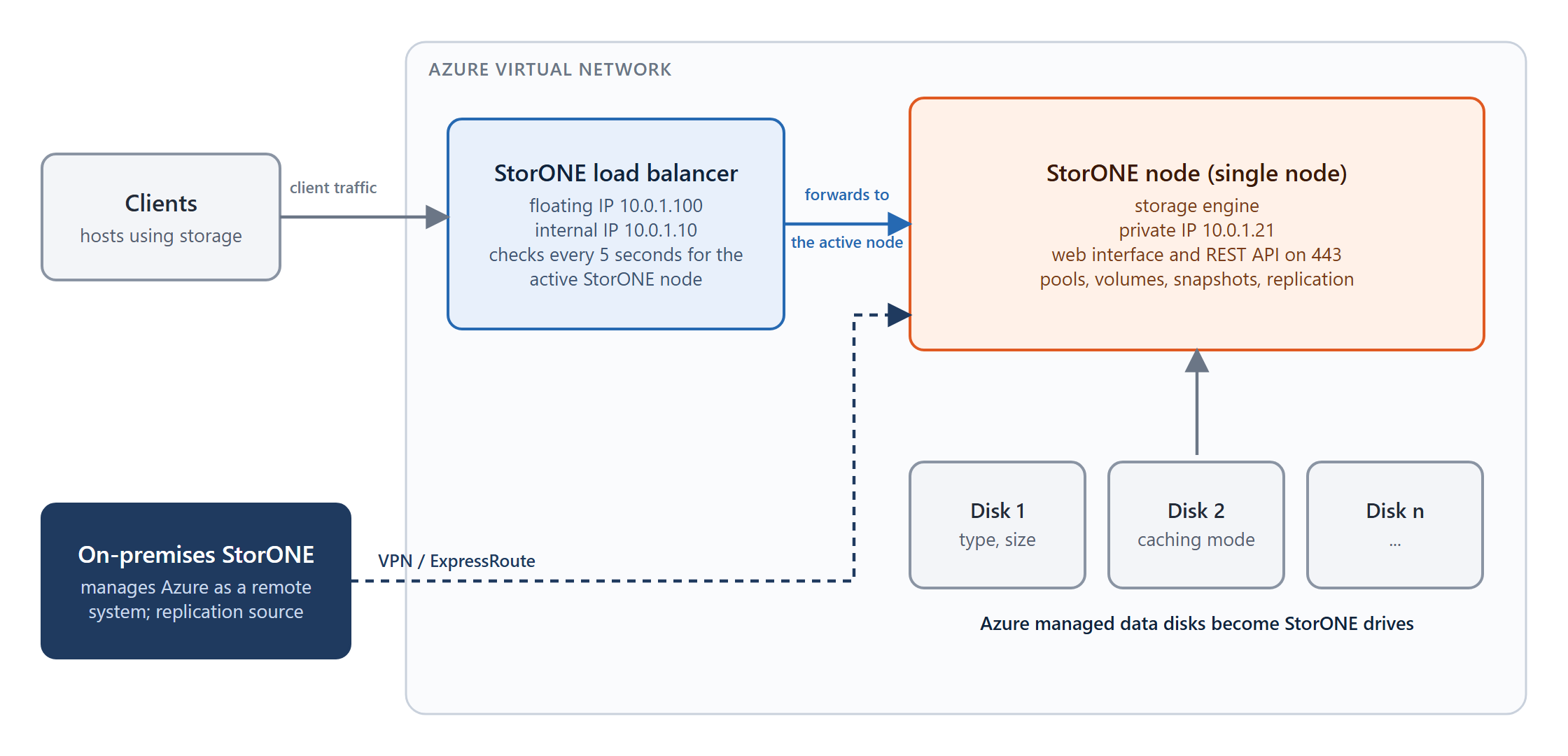
A StorONE system on Azure is managed like any other: through the web interface, the CLI, and the REST API. In a multi-site deployment, you manage it centrally from an on-premises StorONE system as a remote system.
Use cases
Use case
How StorONE on Azure is used
Disaster recovery
Volumes on an on-premises StorONE system are replicated to Azure. If the primary site is lost, the replica on Azure is promoted and serves clients from the cloud.
Off-site copy
A current copy of your production volumes is kept in Azure, outside your data center, under StorONE management.
For a worked example of the disaster-recovery case, see Example: disaster recovery to Azure.
How it differs from an on-premises system
A single node per deployment. High availability (HA pairs) isn't supported on Azure. A StorONE node configured for HA on Azure won't start.
Azure managed disks become drives. The managed data disks attached to the virtual machine are discovered automatically and show up as drives that identify the disk's storage account type and caching mode, so you can see the performance characteristics each drive was created with.
Client access through a load balancer. If you want clients to connect to one fixed address, a StorONE load-balancer component provides a floating IP. It's configured from the load-balancer VM's user data; see Deploying StorONE on Azure.
Managed from on premises. An on-premises StorONE system manages the Azure system as a remote node in multi-system management. A cloud-based system can't register itself locally.
What's next
Deploying StorONE on Azure: prerequisites, the four deployment steps, and the floating IP.
Example: disaster recovery to Azure: replicate a volume from on premises to Azure and promote it if the primary site is lost.
Limitations and best practices
See also: Replication · Systems · Floating IPs
