
Action Policies
Multi-Admin Approval makes sure that sensitive operations on a StorONE system only run after several authorized administrators agree to them. No single administrator account can carry out a protected operation alone: the operation is recorded as a pending action, the authorized reviewers are notified, and it runs only once the required number of administrators has approved it.
You turn this protection on with action policies. An action policy says that a particular kind of operation — deleting a volume, changing a snapshot schedule, or changing an action policy itself — can't happen immediately when someone requests it. Instead, the request is held until enough administrators have reviewed and approved it.
This protects your data and configuration against three common threats:
| Threat | What Multi-Admin Approval does |
|---|---|
| Accidental changes | A destructive operation, such as deleting the wrong volume or shortening a snapshot retention period, is held as a pending action and reviewed by other administrators before it runs. A mistake is caught before any data is lost. |
| Insider threats | A single administrator can't delete volumes, weaken snapshot retention, or remove the protection itself without the agreement of their peers. Every request, approval, and decline is recorded in the audit log. |
| Compromised credentials | An attacker who obtains one administrator account still can't delete volumes or run any other protected operation. Scheduled snapshots stay immutable, so a clean point in time remains available for recovery. |
Action policies themselves are configured on this page. The review workflow that plays out once a policy is triggered is covered in Pending Actions.
If you used vSnapLock (immutable scheduled snapshots) in an earlier StorONE version, it's now part of Multi-Admin Approval: you turn it on by creating a Snapshot scheduler action policy. See "Protecting scheduled snapshots" below.
What an action policy governs
An action policy is defined by two things: an entity type (what kind of thing it governs) and an operation type (what kind of change to that thing it governs). Only specific combinations are supported:
| Entity type | Operation | What needs approval |
|---|---|---|
| Volume | Delete | Deleting a volume. |
| Snapshot scheduler | Edit | Changing a snapshot schedule. Also makes scheduled snapshots immutable. |
| Action Policy | Create, Edit, Delete | Changing the approval policies themselves. |
A policy is named after its entity type and operation, for example Volume Delete or Snapshot scheduler Edit. You can only have one action policy per combination.
Once a policy exists, any user who triggers the governed operation — for example, a ReadWrite user running applications volumes delete on a volume — no longer performs it directly. StorONE instead creates a pending action and leaves the operation un-applied until the policy's approval requirements are met. If an approved volume delete happens on a system that has a recycle bin configured, the volume is moved to the recycle bin rather than being deleted outright — see Recycle Bin.
Creating, editing, or deleting action policies — and approving or declining pending actions — requires the Admin role in your organization, and only Admin users can be named as reviewers. Any user can still see and cancel the pending actions they personally triggered; see Pending Actions.
Protecting scheduled snapshots
While a Snapshot scheduler Edit policy exists:
- Scheduled snapshots are immutable. Any request to delete a snapshot that was created by the snapshot scheduler is rejected — for all users, through every interface — with the message
Action policy of type "Snapshot scheduler" blocks this operation. - Retention still works. The snapshot scheduler keeps removing snapshots itself when their retention period ends, so capacity is reclaimed on a predictable schedule.
- The schedule is protected. Changing a schedule's frequency or retention, or disabling one of its entries, becomes a pending action that needs approval from the configured number of administrators.
- On-demand snapshots stay flexible. Snapshots an administrator takes manually are managed normally and can be created and removed as needed.
The protection applies to every existing scheduled snapshot from the moment the policy is created. See Snapshots for how snapshot schedules work.
A recommended set of policies
A complete deployment combines these policies, so that both your data and the protection itself need more than one administrator to change:
| Action policy | Role in the deployment |
|---|---|
Snapshot scheduler Edit |
Scheduled snapshots are immutable, and schedule changes need approval. |
Volume Delete |
Volume deletion needs approval. |
Action Policy Delete |
Removing any policy, including the snapshot protection, needs approval. |
Action Policy Edit |
Changing a policy's reviewers or approval threshold needs approval. |
Action Policy Create (optional) |
Adding new policies needs approval. |
Think of it in layers: the Action Policy policies protect the policies themselves, and the Volume and Snapshot scheduler policies protect your data. Email notifications complement all of them, so reviewers find out as soon as an action is waiting for their review.
An example. A system is managed by three administrators, alice, bob, and carol. Each of the four main policies names all three as reviewers and requires 2 approvals, and the volumes have a snapshot schedule of hourly snapshots kept 7 days, daily snapshots at 02:00 kept 30 days, and weekly snapshots on Sunday at 03:00 kept 12 weeks. With this configuration:
- Every scheduled snapshot is kept for its full retention period.
- Shortening retention, disabling a schedule, deleting a volume, or changing a protection policy needs agreement from two administrators.
Setting up Multi-Admin Approval
This walkthrough builds the recommended set above. It assumes you have at least as many Admin users as the number of approvals you plan to require — three or more is recommended — each with a valid email address on their user account.
-
Configure email notifications so reviewers are told when an action is waiting for them. See Notifications for the mail server settings.
-
Configure the snapshot schedule on the volumes you want to protect, if you haven't already. See Snapshots.
-
Create the policy-protection policies first, so the protection can't be weakened by one administrator while you're setting it up:
action_policies create --entityType "Action Policy" --operationType Delete --authorizedReviewers alice bob carol --minimumRequiredReviewers 2 action_policies create --entityType "Action Policy" --operationType Edit --authorizedReviewers alice bob carol --minimumRequiredReviewers 2 -
Create the data-protection policies:
action_policies create --entityType Volume --operationType Delete --authorizedReviewers alice bob carol --minimumRequiredReviewers 2 action_policies create --entityType "Snapshot scheduler" --operationType Edit --authorizedReviewers alice bob carol --minimumRequiredReviewers 2 -
Verify with
action_policies list. A request to delete a scheduled snapshot should now be rejected, and a request to delete a volume should now create a pending action that waits for approval.
The same steps work from the web interface — see the sections below. Once an Action Policy Create policy exists, creating further policies itself becomes a pending action that needs approval.
Creating an action policy
Using the web interface
- Open Administration > Action Policies.
- Click Create.
- Fill in:
- Entity Type — the kind of thing to govern: Volume, Snapshot scheduler, or Action Policy.
- Operation Type — the operation on that entity type to govern. The choices offered depend on the entity type you picked (for example, Volume only offers Delete).
- Authorized Reviewers — the Admin usernames allowed to approve or decline pending actions created by this policy. Only Admin users are offered. Must include at least as many usernames as Minimum Required Reviewers.
- Minimum Required Reviewers — how many of the authorized reviewers must approve before the action is carried out. Minimum of 2, and no more than the number of reviewers you selected.
- Click Submit to create the policy.
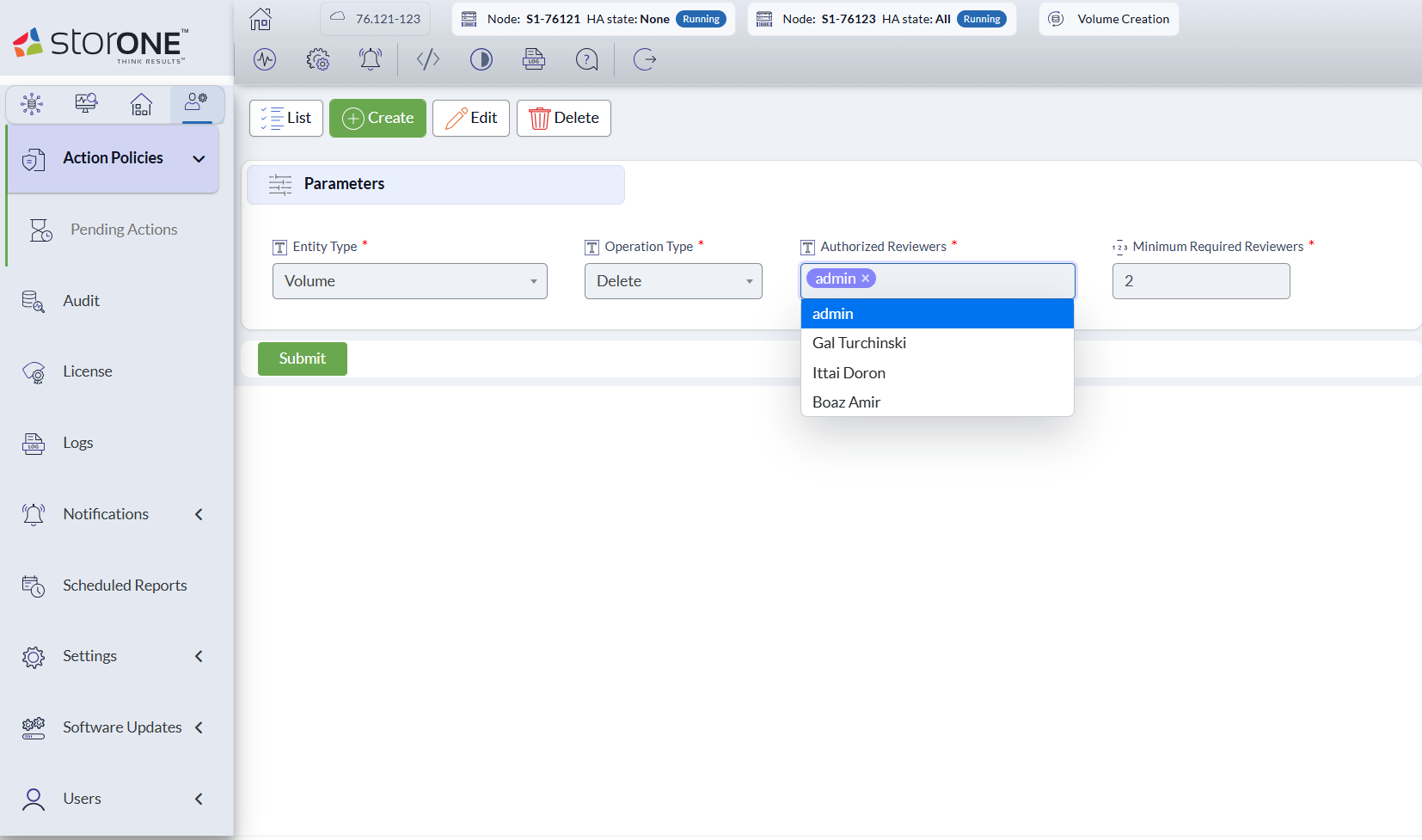
Creating a Volume Delete policy: Entity Type is Volume, Operation Type is Delete, the Authorized Reviewers list offers Admin accounts, and Minimum Required Reviewers is 2.
Using the CLI
action_policies create --entityType=<name> --operationType=<name> --authorizedReviewers=<name...> --minimumRequiredReviewers=<numbers>
| Option | Description |
|---|---|
--entityType=<name> |
The entity type this action policy applies to (Volume, Snapshot scheduler, or Action Policy). |
--operationType=<name> |
The operation type this action policy applies to. Must be an operation type enforced for the chosen entity type. |
--authorizedReviewers=<name...> |
Usernames of the admins authorized to review this policy's pending actions. Must include at least --minimumRequiredReviewers admins. |
--minimumRequiredReviewers=<numbers> |
The minimum number of admin approvals required (at least 2). |
Examples
Require two of three specific admins to approve any volume deletion:
action_policies create --entityType Volume --operationType Delete --authorizedReviewers alice bob carol --minimumRequiredReviewers 2
Require both admins to approve any change to a snapshot schedule, and make scheduled snapshots immutable:
action_policies create --entityType "Snapshot scheduler" --operationType Edit --authorizedReviewers alice bob --minimumRequiredReviewers 2
Editing an action policy
You can change who the authorized reviewers are and how many approvals are required. The entity type and operation type an existing policy governs can't be changed — delete the policy and create a new one instead.
Using the web interface
- Open Administration > Action Policies.
- Select the policy and click Edit.
- Update Authorized Reviewers and/or Minimum Required Reviewers.
- Confirm the change.
Using the CLI
action_policies edit <name> --authorizedReviewers=<name...> --minimumRequiredReviewers=<numbers>
| Option | Description |
|---|---|
<name> |
The name of the action policy to edit — this is the entity type and operation type together, e.g. Volume Delete (the names appear in the output of action_policies list, described below). |
--authorizedReviewers=<name...> |
Usernames of the admins authorized to review this policy's pending actions. Must include at least --minimumRequiredReviewers admins. |
--minimumRequiredReviewers=<numbers> |
The minimum number of admin approvals required (at least 2). |
Example — add a third reviewer and require any two of the three to approve:
action_policies edit "Volume Delete" --authorizedReviewers alice bob carol --minimumRequiredReviewers 2
Listing action policies
Using the web interface
Open Administration > Action Policies and click List. Filter by Name or Entity Type, click Submit, and select a policy to see its details: entity type, operation type, minimum required reviewers, and authorized reviewers.
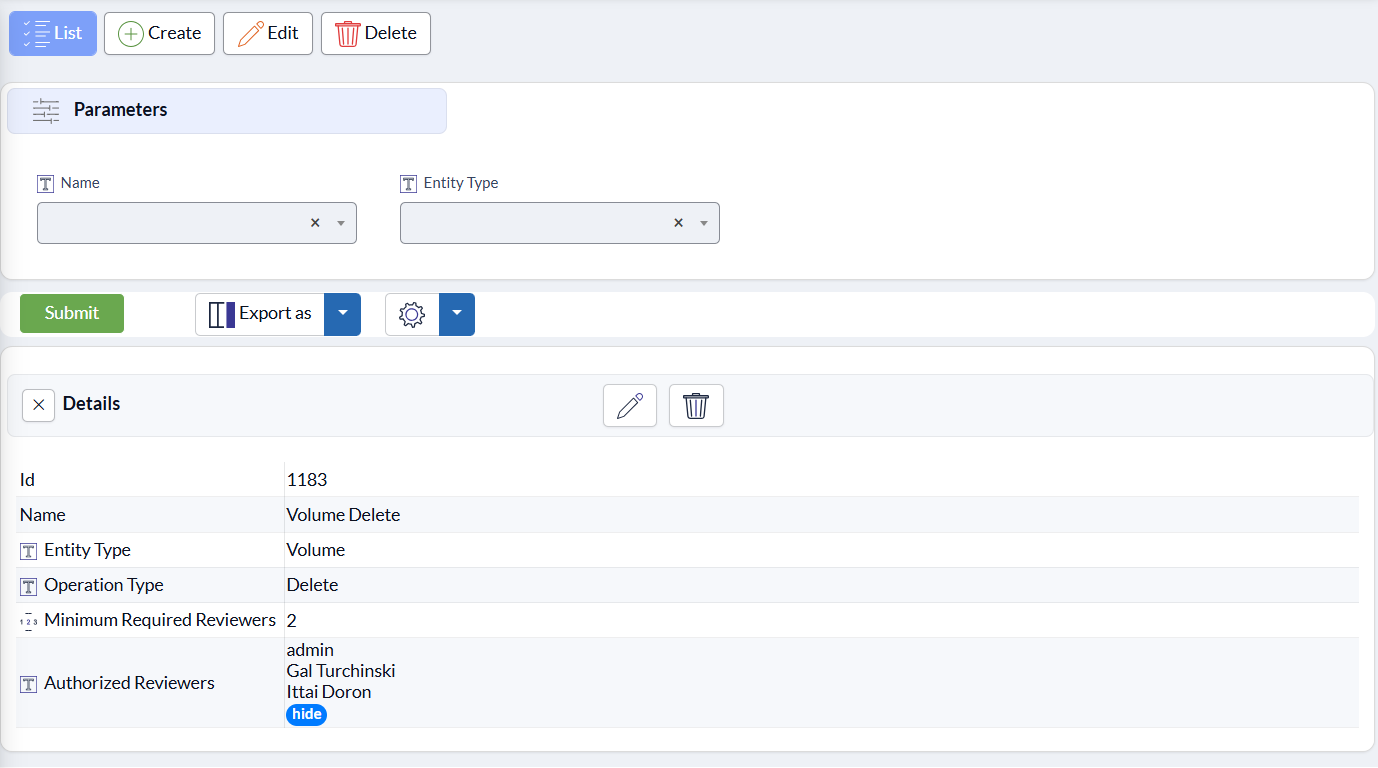
The details of a Volume Delete policy. The pencil and trash icons in the Details header edit or delete it.
Using the CLI
action_policies list [<name>] [--entityType=<name>] [--operationType=<name>]
| Option | Description |
|---|---|
<name> |
Filter action policies by name (<EntityType> <OperationType>, e.g. Volume Delete). |
--entityType=<name> |
Filter by entity type. |
--operationType=<name> |
Filter by operation type. |
Examples
List every configured action policy:
action_policies list
List only policies governing volume deletion:
action_policies list --entityType Volume --operationType Delete
Deleting an action policy
You can't delete an action policy while it has a pending action associated with it — resolve (approve/decline, then let it complete or get cancelled) or delete that pending action first. See Pending Actions. If you have an Action Policy Delete policy, deleting a policy is itself a pending action that needs approval.
Using the web interface
- Open Administration > Action Policies.
- Select the policy and click Delete.
- Confirm the deletion.
Using the CLI
action_policies delete <name>
| Option | Description |
|---|---|
<name> |
The name of the action policy to delete (<EntityType> <OperationType>, e.g. Volume Delete). |
Example
action_policies delete "Snapshot scheduler Edit"
Best practices
-
Protect the policies first. Create the
Action Policy DeleteandAction Policy Editpolicies before the others, so the protection itself can only be changed with multi-admin approval. -
Name more reviewers than the minimum. Three reviewers with two required approvals, for example, means an operation is never stuck because one reviewer is unavailable.
-
Choose the threshold with the initiator in mind. An initiator who is also an authorized reviewer counts as the first approval. To require two approvals in addition to the initiator, set the minimum to three.
-
Use individual, named Admin accounts for reviewers, each with a personal email address — not a shared account.
-
Review policy changes promptly. While a change to a policy is waiting for approval, new requests for operations under that policy are declined until the change is approved or cancelled. See Pending Actions.
-
Check for pending reviews regularly:
action_policies pending_actions list --waitingForMyReview
Replicated environments
Action policies are configured per system, so each site keeps independent control. They aren't replicated: to protect snapshot copies on a replication target, configure the same policies on the target system as well. Reviewers and thresholds can be set independently on each system.
Next: Pending Actions — reviewing, approving, declining, and cancelling the actions an action policy holds for review.