
Object Storage
StorONE can serve S3-compatible object storage directly from the storage system. Any S3 client can use it: the AWS CLI and SDKs, s3cmd, rclone, backup software that writes to an S3 target, and data-lake tools. Clients connect to an object store endpoint, which is a floating IP address plus a TCP port on the StorONE system, using path-style addressing (http(s)://<floating IP>:<port>/<bucket>/<key>).
Object storage is a good fit when:
- You need a backup target. Many backup applications write to S3. With Object Lock, backups can be made immutable until a retention date.
- Your applications are already written against S3. Data lakes, archives and media repositories can use the same tools they use with any other S3 service.
- Several tenants or teams need separate endpoints. One system can run many independent object stores, each on its own volume(s) and port, each with its own set of access keys.
How it is built
An object store isn't a separate kind of storage. It runs on top of ordinary StorONE volumes, so it inherits what a volume offers: vRAID protection, pools and tiering, encryption at rest, snapshots and replication.
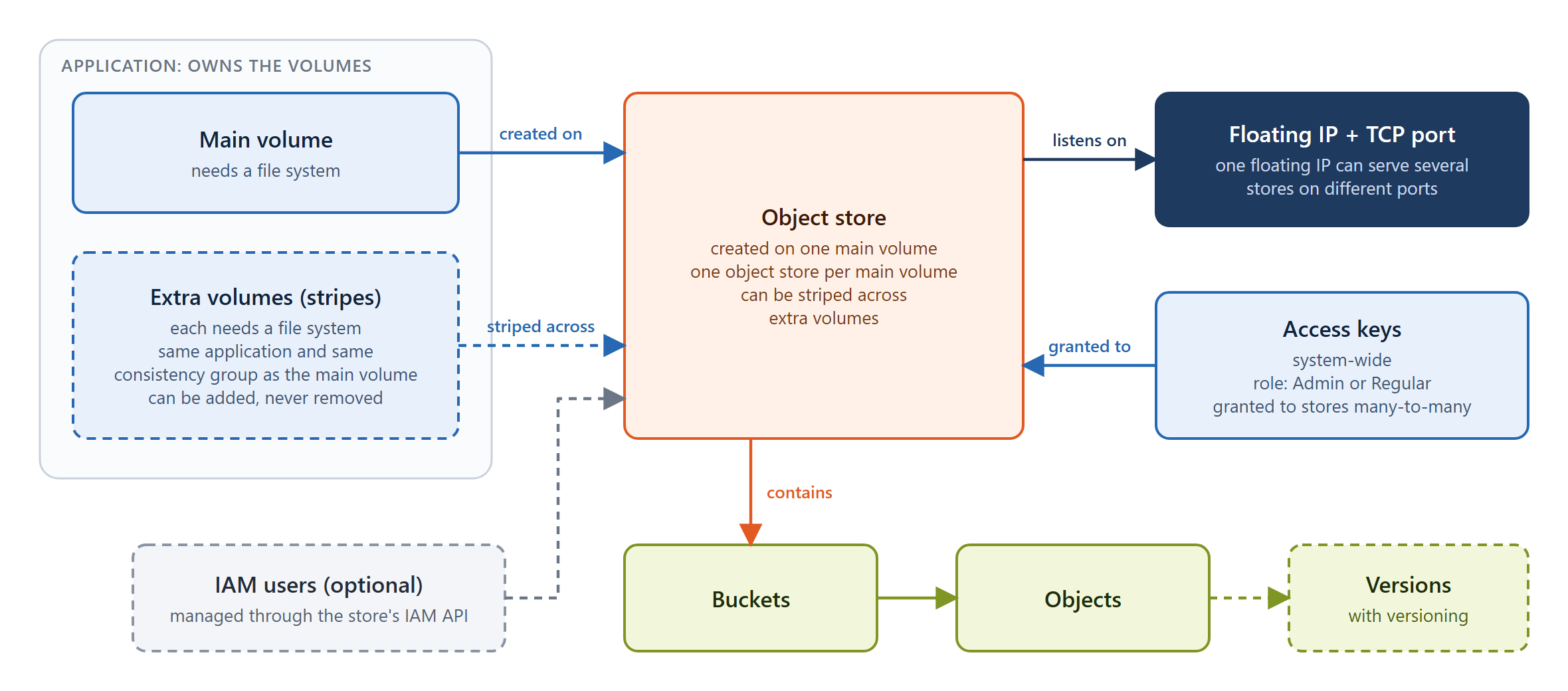
| Building block | What it is |
|---|---|
| Application | The container that owns the store's volumes. |
| Volume | Holds the store's data. It must have a file system before an object store can be created on it. |
| Main volume | The volume the store was created on. Together with its application, it identifies the store in every command (--application and --volume). |
| Striped volumes | Optional extra volumes the store spreads its data across, for more capacity. |
| Floating IP and port | The address the store's S3 endpoint listens on. The floating IP moves between nodes, so the address stays the same after a failover. |
| Access key | An S3 credential (access key ID and secret key) with a role, Admin or Regular. Keys are system-wide: you create a key once and grant it to any number of stores. See Object access keys. |
| IAM users | Optional users managed through the store's IAM API. See Object storage security. |
| Bucket | A standard S3 bucket inside a store. Admin keys create and delete buckets with any S3 tool. |
Rules to know before you start
- One object store per main volume.
- A volume can't belong to two stores: it can't be the main volume of one store and a stripe of another.
- A volume that holds an object store can't also hold SMB/NFS shares.
- Each store must always have at least one Admin access key.
- The port must be between 1025 and 62999, and no two object stores on the system can use the same port. Several stores can share one floating IP on different ports.
- Stripes must be in the same application and the same consistency group as the main volume, and must also have a file system. Stripes can be added later but never removed.
What you manage where
StorONE's web interface, CLI and REST API manage the object store itself: its volumes, endpoint, access keys and IAM settings. They don't manage buckets or objects. Buckets, versioning, Object Lock and the objects themselves are managed through the S3 API, with any S3 client.
In the web interface, object storage is under Applications > Objects, which has two pages: Stores and Access Keys.
In this chapter
- Deploying object storage: end-to-end setup, from floating IP to a working S3 client.
- Object stores: creating, editing, listing and deleting stores.
- Object access keys: the credentials clients connect with.
- Object storage security: key roles, IAM, HTTPS and network exposure.
- Object versioning: keeping every version of every object.
- Object Lock (WORM): immutable object versions with Governance and Compliance retention.
- Capacity and data protection: striping, growing, snapshots, replication and deleting.
- High availability: failover and which changes interrupt clients.
- Monitoring object stores: the per-store metrics.
- Prometheus and Grafana: collecting and graphing those metrics.
- Troubleshooting object storage: common errors and what they mean.
Next: Deploying object storage
No comments to display
No comments to display