
Object Versioning
Versioning keeps every version of every object in a bucket. Overwrites and deletes never destroy earlier data: a previous version can be read or restored until someone deletes it explicitly. Versioning is set per bucket through the S3 API, by an Admin access key or an IAM user whose policy allows it.
Before you enable versioning
That protection costs capacity and housekeeping:
- Capacity grows with every change, not with the data set. Each overwrite keeps the previous copy in full. A 10 GB file rewritten every night uses about 300 GB after 30 days, even though only 10 GB is "live".
- Deleting doesn't free space. A plain DELETE only adds a delete marker; the data stays. Space comes back only when versions are permanently deleted by version ID.
- Versioning can be suspended, but never removed. Suspending stops new versions from being created, but the bucket never returns to unversioned, and every existing version stays until it's deleted.
- Object Lock turns versioning on permanently. On an Object Lock bucket, versioning can't be suspended, and Compliance-mode versions can't be removed before their retention date.
- Someone must own the cleanup. Decide up front who removes old versions and how: the backup application's own retention, or a scheduled cleanup job (below). Without one, the store fills up.
- Buckets are harder to remove. A bucket can be deleted only after every version and every delete marker is gone.
Use versioning when you need per-object undo: recovering overwritten or deleted files, or ransomware-resilient backup repositories with Object Lock. If you only need to roll the whole store back to a point in time, snapshots may be enough, without the per-object version growth.
Versioning states
| State | Behaviour | How you get there |
|---|---|---|
| Unversioned (default) | One copy per key. An overwrite replaces it and a delete removes it. | A new bucket without Object Lock. |
| Enabled | Every PUT or COPY creates a new version with its own version ID. Earlier versions are kept. | put-bucket-versioning Status=Enabled, or automatically when the bucket is created with Object Lock. |
| Suspended | New writes get the version ID null and overwrite the previous null version. Existing versions are kept. |
put-bucket-versioning Status=Suspended. Not allowed on Object Lock buckets. |
How operations behave on a versioned bucket
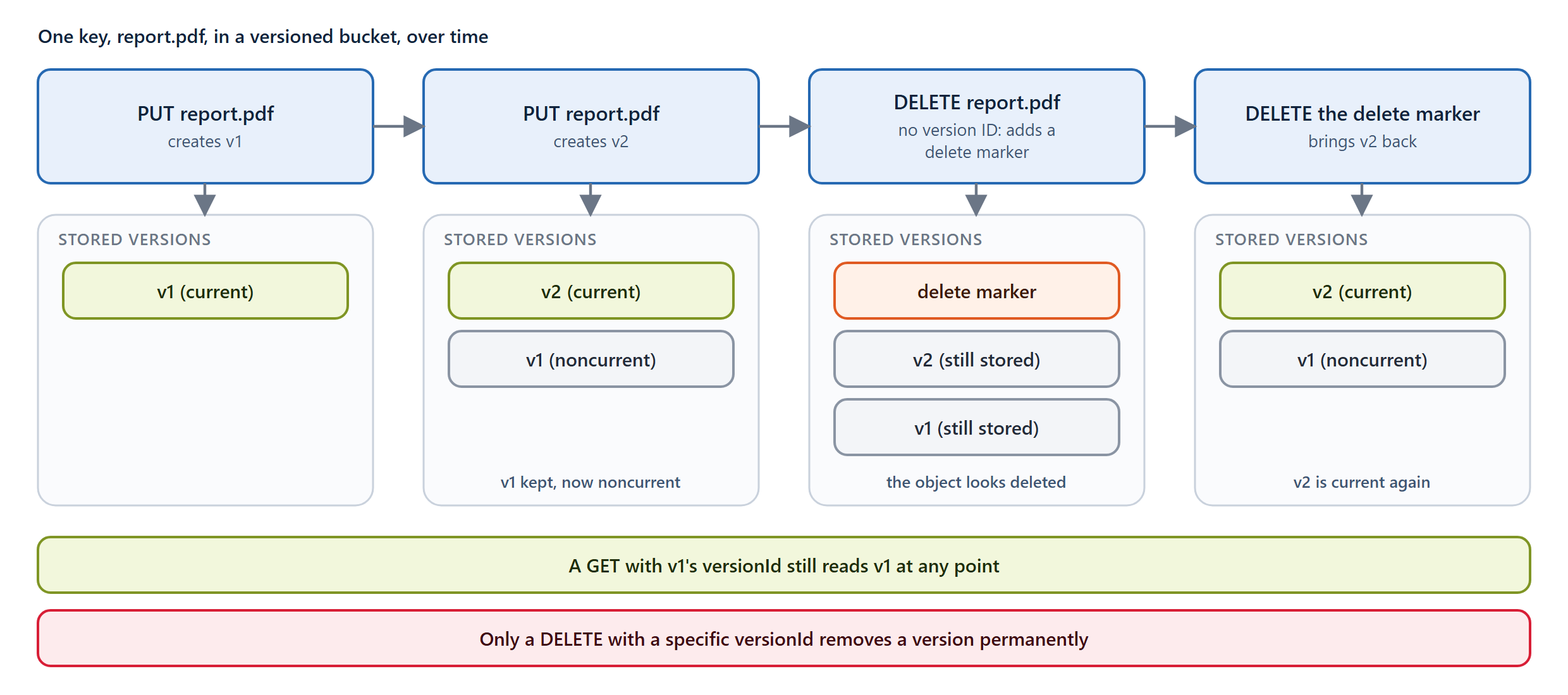
| Operation | Without a version ID | With a version ID |
|---|---|---|
| PUT / COPY | Creates a new current version and returns its version ID. | n/a |
| GET / HEAD | Returns the current version. If the current version is a delete marker, returns 404 NoSuchKey. |
Returns that exact version. |
| DELETE | Doesn't delete data. It adds a delete marker, which becomes the current version, so the object looks deleted. | Permanently deletes that version (subject to Object Lock). |
| List objects | Shows only keys whose current version isn't a delete marker. | n/a |
| List object versions | Shows every version and delete marker of each key. | n/a |
Undeleting an object: delete its delete marker (DELETE with the marker's version ID). The previous version becomes current again.
Rolling back to an earlier version: copy the older version onto the same key. It becomes the new current version, and the history is kept.
Capacity planning and cleanup
- Size for versions, not only live data. A working estimate is live data + (data changed per day × days of versions you keep). Add the full backups that Object Lock keeps until their retention expires.
- Watch the store's capacity with StorONE capacity monitoring of its volumes, and add stripes as needed.
See how much space noncurrent versions use (the AWS CLI pages through the whole bucket):
aws $EP s3api list-object-versions --bucket docs \
    --query 'sum(Versions[?IsLatest==`false`].Size)'
Remove noncurrent versions older than a cut-off date. This is permanent: test it on a bucket you don't need first. Versions protected by Object Lock are refused with AccessDenied and stay in place.
CUTOFF=2026-10-01
aws $EP s3api list-object-versions --bucket docs --output text \
    --query 'Versions[?IsLatest==`false`].[LastModified,Key,VersionId]' |
  awk -F'\t' -v c="$CUTOFF" '$1 < c' |
  while IFS=$'\t' read -r _ key vid; do
    aws $EP s3api delete-object --bucket docs --key "$key" --version-id "$vid"
  done
Backup applications that support S3 versioning or immutability usually remove expired versions themselves. Check the application's documentation before adding your own cleanup job, so the two don't conflict.
Examples
EP="--endpoint-url https://10.0.0.50:9000 --no-verify-ssl"

# Turn on versioning for a bucket
aws $EP s3api put-bucket-versioning --bucket docs --versioning-configuration Status=Enabled
aws $EP s3api get-bucket-versioning --bucket docs

# Write two versions of the same key
aws $EP s3api put-object --bucket docs --key contract.pdf --body v1.pdf   # returns version ID A
aws $EP s3api put-object --bucket docs --key contract.pdf --body v2.pdf   # returns version ID B

# List every version and delete marker
aws $EP s3api list-object-versions --bucket docs --prefix contract.pdf

# Read the older version
aws $EP s3api get-object --bucket docs --key contract.pdf --version-id <A> old.pdf

# "Delete" (adds delete marker M), then undelete by removing the marker
aws $EP s3api delete-object --bucket docs --key contract.pdf
aws $EP s3api delete-object --bucket docs --key contract.pdf --version-id <M>

# Roll back: copy version A over the current version
aws $EP s3api copy-object --bucket docs --key contract.pdf --copy-source "docs/contract.pdf?versionId=<A>"

# Permanently delete one version
aws $EP s3api delete-object --bucket docs --key contract.pdf --version-id <A>

# Suspend versioning (existing versions are kept)
aws $EP s3api put-bucket-versioning --bucket docs --versioning-configuration Status=Suspended
Next: Object Lock (WORM)
No comments to display
No comments to display