
Object Store Capacity and Data Protection
Object
All Storeof Capacityan object store's data and Datametadata Protectionlive on its volumes. That's why stores grow by adding volumes, and why volume snapshots and replication protect the whole store.
Capacity
Growing a store
You can grow a store while clients are connected, in either of two ways. Neither restarts the store's S3 service.
Add stripes. Create one or more volumes, add a file system to each, and add them to the store:
applications volumes create --application=Backup --volume=ObjVol2 --capacity=50TB --pool=Pool1 --n=<n> --k=<k> --groupedVolume=ObjVol1
applications filesystems add --application=Backup --volumes=ObjVol2
applications objects stores edit --application=Backup --volume=ObjVol1 --stripedVolumes=ObjVol2
--groupedVolume=ObjVol1 puts the new volume in the main volume's consistency group.
Grow the volume and its file system. The store picks up the new space by itself.
Striping rules
Every striped volume must:
Stripes can be added, never removed. Through the REST API, an edit of a striped store must list all existing stripes plus the new ones (see Editing through the REST API).
Snapshots and restore
Because the stripes must share a consistency group, a snapshot of the store's volumes is a consistent point-in-time copy of the whole store: every bucket, every object version and every Object Lock setting.
Schedule snapshots like for any other volume (see Scheduling snapshots):
applications snapshots schedulers schedule --application=Backup --volume=ObjVol1 ...
Restoring into a new store
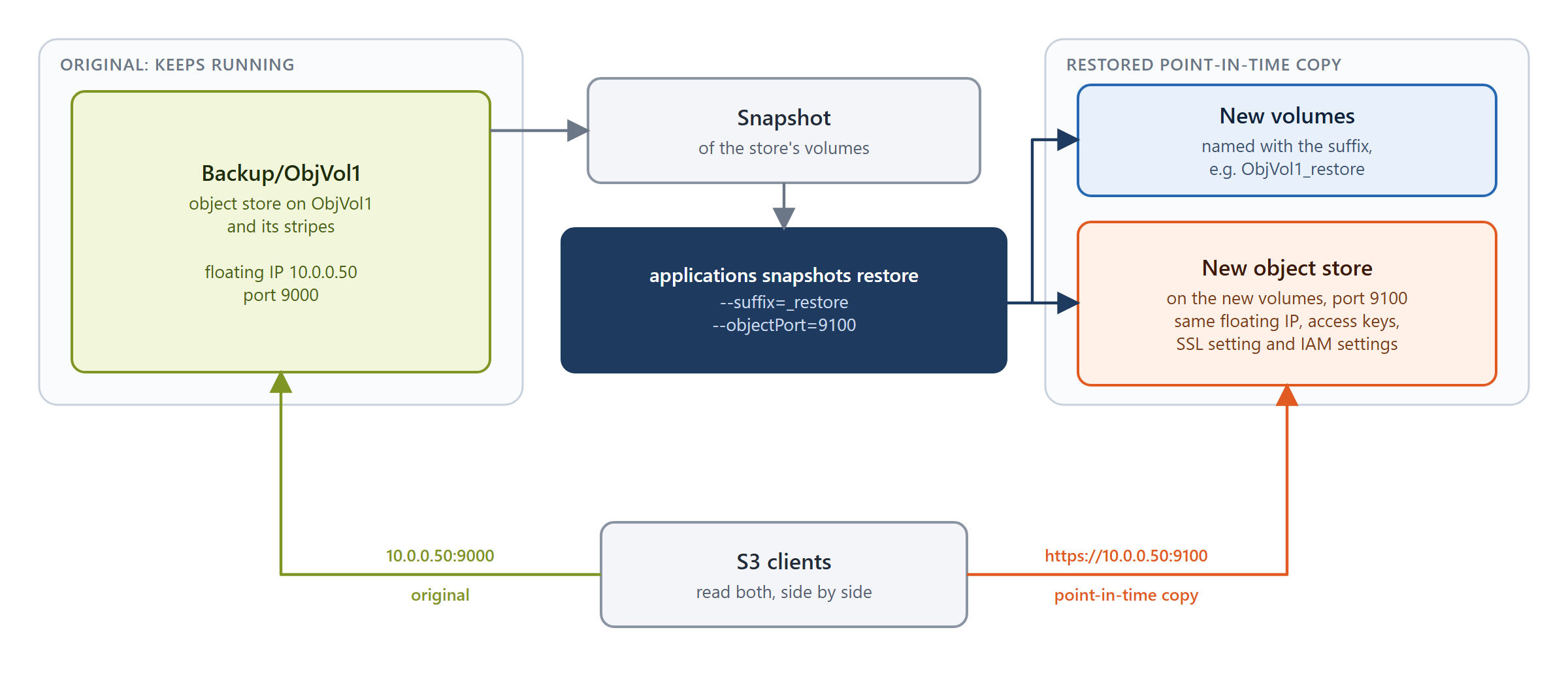
Restoring a snapshot doesn't roll the store back in place. It creates new volumes, named after the originals plus a suffix, and a new object store on them:
applications snapshots restore --application=Backup --volume=ObjVol1 --snapshot=<id> --suffix=_restore --objectPort=9100
The new store has:
--objectPort, which no other object store may be using.
The original store keeps running. Clients can read the point-in-time copy at http(s)://<same floating IP>:9100, side by side with the original, and copy back what they need. When you're done, delete the restored store by deleting its volumes.
Replication
Object stores are replicated with StorONE volume replication. The store's volumes share one consistency group, so they're replicated together.
To make the store reachable at its own address on the target system, pair the local floating IP with a floating IP on the remote system (see Floating IP replication pairing):
floatingips pair <name> --targetSystem=<name> --remoteNodes=<text...> --remoteInterfaces=<text...>
Deleting a store
An object store is deleted together with its volumes (see Deleting an object store). Before you delete one:
Next: High availability