
Object Storage Security
This page covers who can do what in an object store, the optional IAM API, HTTPS, and which network addresses a store exposes. For creating keys, see Object Storageaccess Securitykeys; for the store settings, see Object stores.
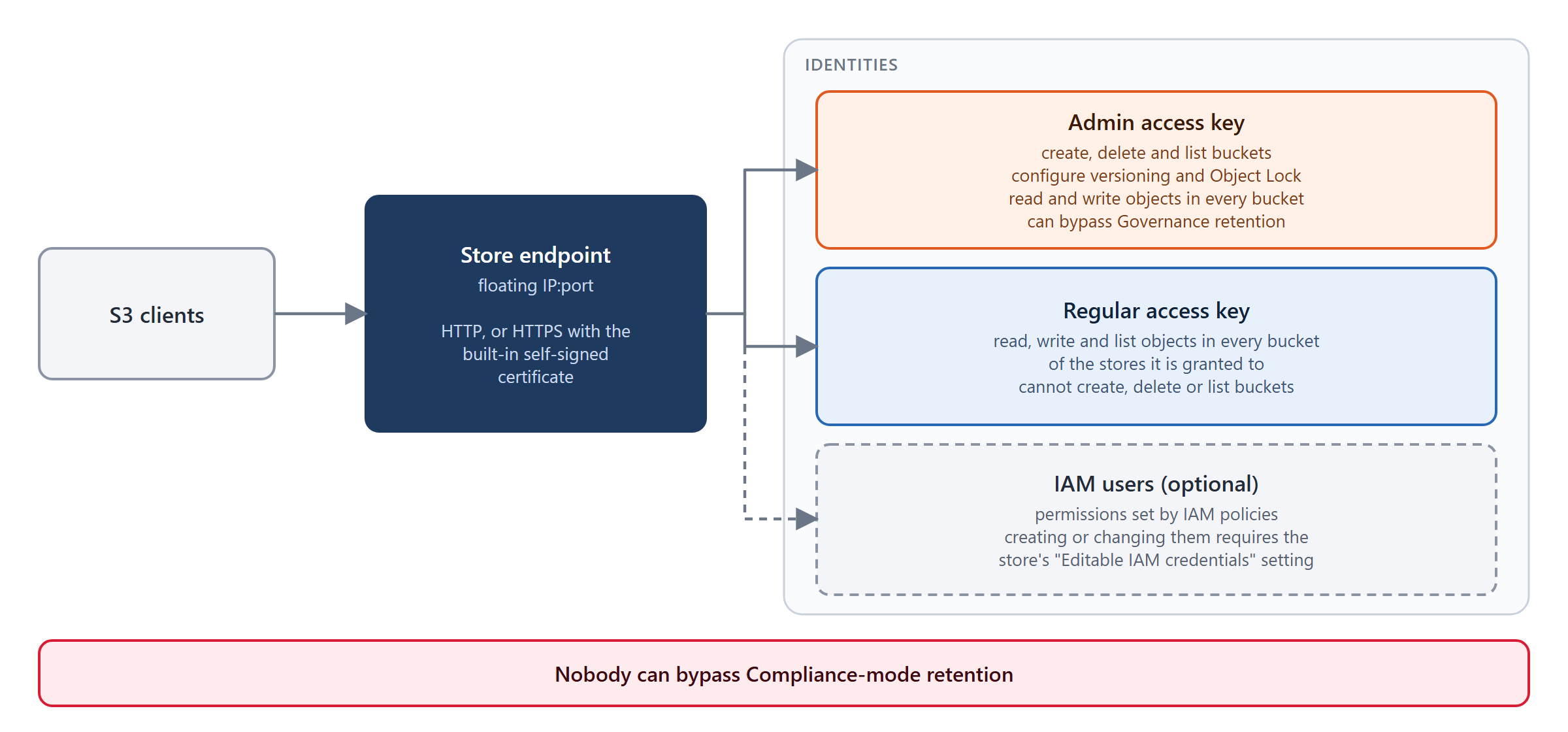
Access key roles
Things to keep in mind:
IAM
Each store can expose an IAM-compatible API on the same endpoint. It's controlled by two settings:
--support_iam_credentials
On
Enables the IAM API on the store, read-only.
Editable IAM credentials
--editable_iam_credentials
Off
Allows changes through the IAM API: creating, editing and deleting users, access keys and policies, and assigning policies. Requires the first setting.
To create IAM users, turn both settings on. Then use an Admin access key with any IAM-compatible tool, pointing it at the store's endpoint. For example:
EP="--endpoint-url https://10.0.0.50:9000 --no-verify-ssl"
aws $EP iam create-user --user-name tenant-a
aws $EP iam create-access-key --user-name tenant-a
aws $EP iam put-user-policy --user-name tenant-a --policy-name tenant-a-buckets --policy-document file://tenant-a.json
Use IAM when tenants or applications need their own credentials and bucket-level permissions without a StorONE administrator creating each key. For example, a backup application can be allowed to write with retention but not to bypass Governance, or a tenant can be restricted to its own buckets.
Changing either IAM setting restarts the store's S3 service, so clients briefly reconnect.
HTTPS
--enableSsl (and off again with --disableSsl on edit, or the Enable SSL box in the web interface).
With HTTPS on, the store's port serves HTTPS only. With it off, the port serves HTTP only.
Clients aren't asked for a client certificate.
Changing the setting restarts the store's S3 service.
HTTPS uses a built-in, self-signed certificate. The certificate doesn't contain the endpoint's IP address or DNS name, so a client that checks certificates rejects the connection, even if you add the certificate to the client's trusted certificates. Every HTTPS client must be set to skip certificate verification, for example --no-verify-ssl in the AWS CLI. Traffic is encrypted, but the client doesn't verify the server's identity.
Using your own certificate isn't supported. If your security policy doesn't allow clients to skip certificate verification, or an application can't be configured to skip it, run the store on HTTP on an isolated network (below).
Running HTTP on an isolated network
If HTTPS doesn't fit, run the store with SSL off and put its floating IP on a dedicated, segmented network that only the S3 clients can reach. Traffic isn't encrypted in transit, so use this only on networks you trust.
Network exposure
Next: Object versioning