
Object Lock (WORM)
Object Lock stores object versions in WORM (write-once-read-many) form: a locked version can't be overwritten or deleted until its retain-until date. Typical uses are immutable backup repositories (ransomware protection), record retention and audit logs.
Object Lock is set up per bucket and per object through the S3 API, by an Admin access key or an IAM user whose policy allows it. It builds on versioning, so read that page first.
Turning on Object Lock
--object-lock-enabled-for-bucket). It can't be added to an existing bucket.
Creating an Object Lock bucket turns versioning on automatically, and it can't be suspended on that bucket.
Object Lock can't be turned off on a bucket once it's on.
Retention is set per object version, in either of two ways:
put-object-lock-configuration). It's applied automatically to every new version written to the bucket.
Explicit per-version retention: a mode plus a retain-until date, given at upload (--object-lock-mode, --object-lock-retain-until-date) or later (put-object-retention). It overrides the bucket default for that version.
The two retention modes
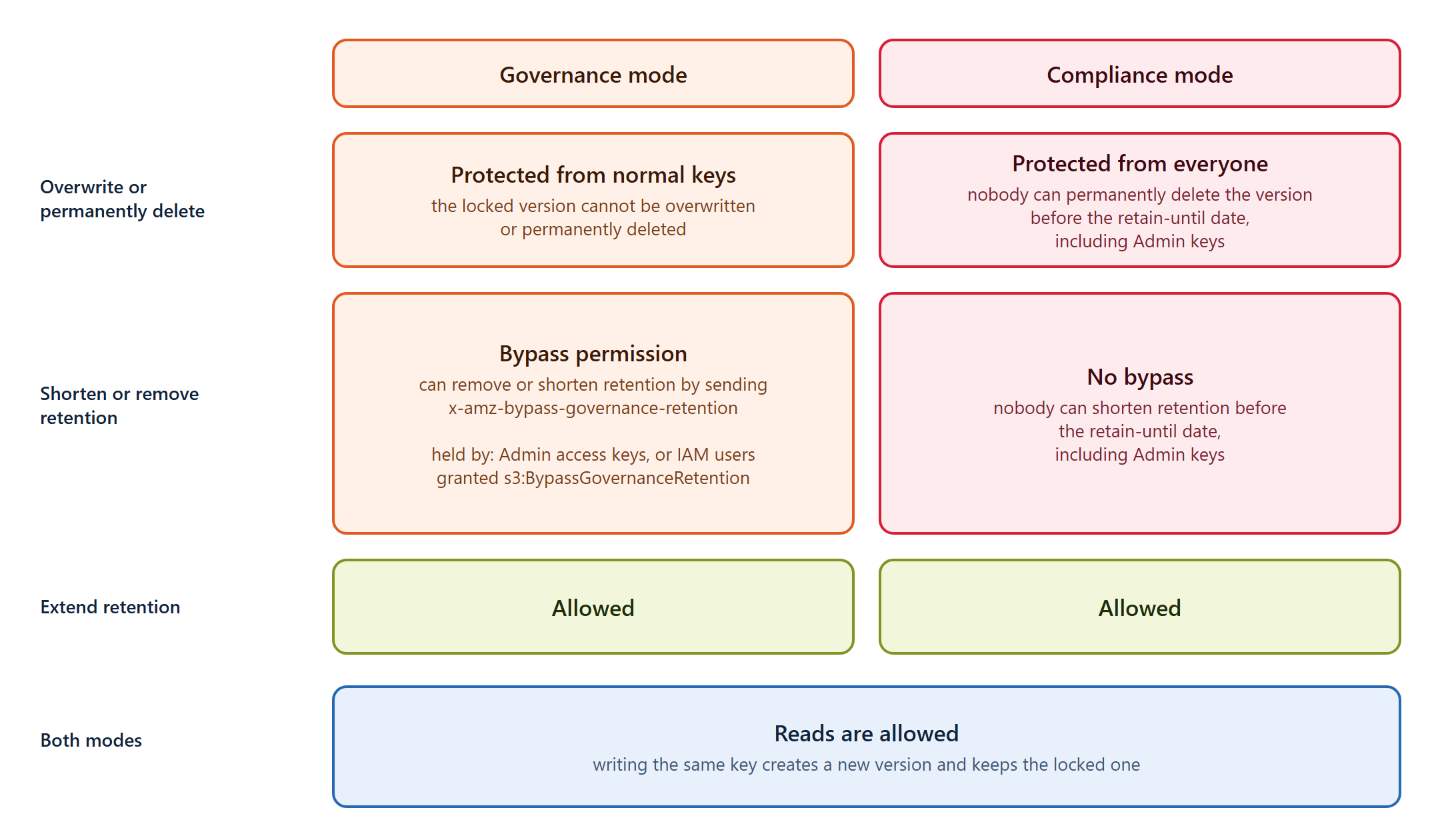
s3:BypassGovernanceRetention, when they send x-amz-bypass-governance-retention: true.
No bypass exists.
Shorten or remove retention
Only with bypass.
Never.
Extend retention
Allowed.
Allowed.
Change mode
Can be upgraded to Compliance.
Can't be changed to Governance.
Protection ends
At the retain-until date, or earlier through a privileged bypass.
Only at the retain-until date.
Typical use
Testing retention policies; operational protection; data that may need early removal.
Immutable backups and records that must not be removable before their date.
Choose carefully. A version written in Compliance mode, or into a bucket whose default retention is Compliance, can't be deleted through S3, and its capacity can't be reclaimed, until the retention date. Test with Governance mode first, then switch the bucket default to Compliance.
What Object Lock blocks
Object Lock protects versions, not key names. A plain DELETE still hides the object behind a delete marker, but the locked data stays intact and can be recovered by removing the marker (see Object versioning).
Who can do what
s3:BypassGovernanceRetention
Bypass Compliance
No
No
No
Object Lock and the rest of StorONE
Setting up an immutable backup repository
Examples
EP="--endpoint-url https://10.0.0.50:9000 --no-verify-ssl"

# Create a bucket with Object Lock (WORM)versioning is turned on automatically)
aws $EP s3api create-bucket --bucket immutable-backups --object-lock-enabled-for-bucket

# Default retention: Compliance, 30 days, for every new object version
aws $EP s3api put-object-lock-configuration --bucket immutable-backups \
    --object-lock-configuration '{"ObjectLockEnabled":"Enabled","Rule":{"DefaultRetention":{"Mode":"COMPLIANCE","Days":30}}}'
aws $EP s3api get-object-lock-configuration --bucket immutable-backups

# Upload with explicit Governance retention
aws $EP s3api put-object --bucket immutable-backups --key job-0412.vbk --body job-0412.vbk \
    --object-lock-mode GOVERNANCE --object-lock-retain-until-date 2027-01-01T00:00:00Z

# Inspect or extend the retention of a version
aws $EP s3api get-object-retention --bucket immutable-backups --key job-0412.vbk --version-id <id>
aws $EP s3api put-object-retention --bucket immutable-backups --key job-0412.vbk --version-id <id> \
    --retention '{"Mode":"GOVERNANCE","RetainUntilDate":"2027-06-01T00:00:00Z"}'

# Governance only: an Admin key removes a protected version early
aws $EP s3api delete-object --bucket immutable-backups --key job-0412.vbk --version-id <id> \
    --bypass-governance-retention

# Compliance: the same command is refused (AccessDenied) until the retain-until date