
Pending Actions
When an action policy is in place for an operation, performing that operation doesn't happen immediately — it creates a pending action instead, which sits waiting for review until enough of the policy's authorized reviewers approve it.
How approval works
- Initiation. A user starts an operation covered by an action policy. StorONE doesn't run it. It records the operation as a pending action and sends an email to every authorized reviewer of the policy.
- Review. Each authorized reviewer can approve or decline the pending action. If the user who started the operation is also an authorized reviewer, their request counts as the first approval.
- Completion. When the number of approvals reaches the policy's minimum and no reviewer has declined, the operation runs automatically and the pending action disappears from the list.
- Decline. One decline is enough to hold the operation, even if it already has enough approvals. A reviewer can change their decision later — approving removes you from the decliners, and declining removes you from the approvers.
- Cancellation. The user who started the operation, or any Admin, can cancel a pending action at any time. Nothing is applied.
Pending actions have no expiry. They stay open until they're approved and run, or cancelled, so reviewers in different time zones have as much time as they need.
Decline and cancel compared
| Decline | Cancel | |
|---|---|---|
| Who can do it | An authorized reviewer of the policy. | The user who started the request, or any Admin. |
| Effect | Records the reviewer's objection. The request stays open and can't run while any decline is recorded. | Withdraws the request. The requested change is discarded. |
| Reversible | Yes. The reviewer can approve later, which replaces their decline. | No. To perform the operation, submit it again. |
| Objects in the request | Remain locked (see below). | Released for other changes. |
A decline lets reviewers stop an operation while keeping the request available for further discussion. Once a declined request is no longer needed, cancel it to close it and release the objects it covers.
Built-in safeguards
- Only Admins can review. Only Admin accounts can be named as authorized reviewers, and only authorized reviewers can approve or decline.
- Individual decisions. Each reviewer records only their own decision. You can't approve a pending action you've already approved, or decline one you've already declined.
- Entity locking. While a pending action is open, the objects in the requested change are locked against further configuration changes, so reviewers approve exactly the operation that will run. For example, while the deletion of volume
vol1waits for approval, other configuration changes tovol1are declined, and so is a second request involvingvol1. The message points to Administration > Action Policies > Pending Actions. The lock is released when the pending action completes or is cancelled. - Policy consistency. If a change to an action policy is itself waiting for approval, new requests for operations under that policy are declined until the change is approved or cancelled. Every request is therefore reviewed under a settled, agreed policy. For example, while a change to the
Volume Deletepolicy is waiting, a new volume deletion request is declined with a message pointing to Administration > Action Policies > Pending Actions. Submit the request again once the policy change is resolved. - Recycle bin. An approved volume deletion moves the volume to the recycle bin when the recycle bin is enabled, so it can be restored within the configured time limit. See Recycle Bin.
Who sees what
Admins see every pending action in the system, with the full list of reviewers and their decisions. Other users see only the pending actions they started, and can't see who else has approved or declined — a decline just shows as "Declined by Reviewer" rather than a username.
Audit trail
Every step is recorded in the system event log and raised as a notification in the Audit category, so you can route them to a target of your choice (see Notifications):
| Event | Recorded when |
|---|---|
PendingActionCreation |
A pending action is created. |
PendingActionApproval |
A reviewer approves. |
PendingActionDecline |
A reviewer declines. |
PendingActionBlockedForCompletion |
Enough approvals are reached, but the action is held by a decline. |
PendingActionCompletion |
The operation runs. |
Listing pending actions
Using the web interface
When an operation covered by an action policy is requested, the web interface shows a pending actions indicator in the top icon bar. The badge counts the open pending actions, and the pop-up summarizes each one: the policy, how many approvals it has out of the minimum required (for example Admins: 1/2), the requested command, and how long ago it was created.
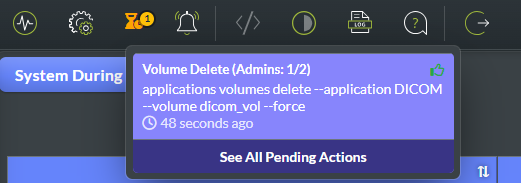
One pending action under the Volume Delete policy, with 1 of the 2 required approvals.
To review them, click See All Pending Actions in the pop-up, or open Administration > Action Policies > Pending Actions. Click Submit to list the pending actions. Use Waiting For My Review to show only the ones you can still decide on, or Only My Pending Actions to show the requests you started. You can also pick a specific action by Id.
Select a row to open its details:
- Action Policy — the policy that covers the request, with the approvals so far out of the minimum required.
- Action Description — the exact operation that will run once it's approved.
- Approvers and Reviewable By — who has already approved, and which reviewers can still decide.
- Timestamp and Initiated By — when the request was created and by whom.
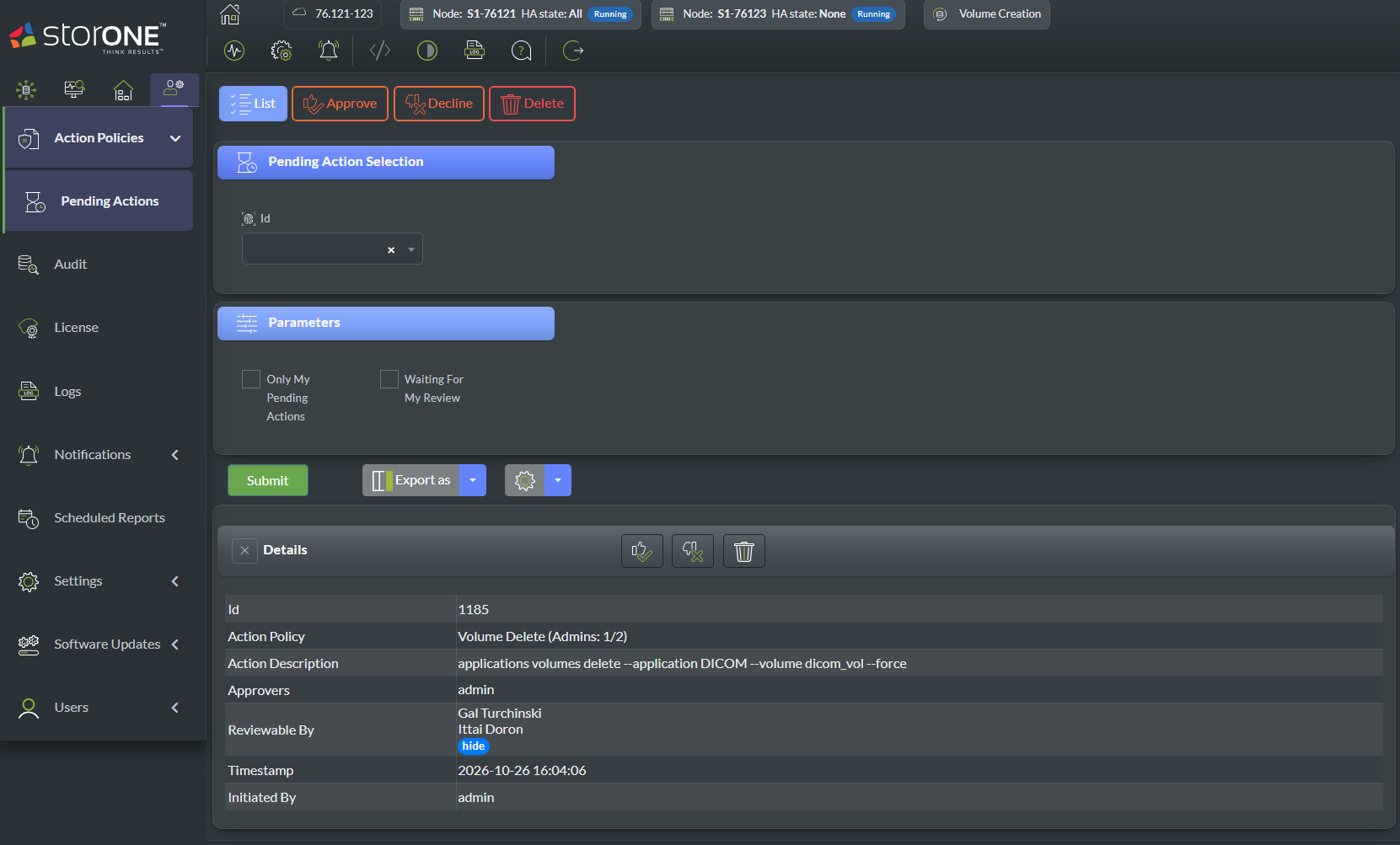
A volume deletion request under the Volume Delete policy. The initiator (admin) has approved it, and the other authorized reviewers can still decide. Approve, Decline, and Delete are in the toolbar and in the Details header.
Admins see every pending action; other users see only the ones they triggered.
Using the CLI
action_policies pending_actions list [<id>] [--onlyMyPendingActions] [--waitingForMyReview]
| Option | Description |
|---|---|
<id> |
Filter pending actions by ID. |
--onlyMyPendingActions |
Show only pending actions relevant to you (always applied for non-admin users, regardless of this flag). |
--waitingForMyReview |
Show only pending actions that are still awaiting your review as an authorized reviewer. |
Examples
List everything waiting on your review as an admin:
action_policies pending_actions list --waitingForMyReview
List only the pending actions you personally triggered:
action_policies pending_actions list --onlyMyPendingActions
Approving a pending action
Using the web interface
- Open Administration > Action Policies > Pending Actions.
- Select the pending action (or select several at once) and click Approve. You can also use the approve icon in the details header.
Once the number of approvals reaches the minimum and no reviewer has declined, the operation runs automatically.
Using the CLI
action_policies pending_actions approve <id>
| Option | Description |
|---|---|
<id> |
The ID of the pending action to approve. |
Example
action_policies pending_actions approve 142
Declining a pending action
Declining blocks the pending action from completing, even if it already has enough approvals — it stays blocked until the decline is withdrawn (by approving it) or the pending action is cancelled.
Using the web interface
- Open Administration > Action Policies > Pending Actions.
- Select the pending action (or select several at once) and click Decline.
Using the CLI
action_policies pending_actions decline <id>
| Option | Description |
|---|---|
<id> |
The ID of the pending action to decline. |
Example
action_policies pending_actions decline 142
Cancelling a pending action
Deleting a pending action cancels the underlying request — it does not perform it, no matter how many approvals it had collected. Non-admin users may only delete pending actions they personally triggered; admins may delete any.
Using the web interface
- Open Administration > Action Policies > Pending Actions.
- Select the pending action and click Delete.
Using the CLI
action_policies pending_actions delete <id>
| Option | Description |
|---|---|
<id> |
The ID of the pending action to delete. |
Example
action_policies pending_actions delete 142
Using the REST API
Reviewing and cancelling pending actions maps onto these endpoints. See the Action policies endpoint reference for every parameter.
| Operation | Request |
|---|---|
| List pending actions | GET /action_policies/pending_actions/list (optionally ?waitingForMyReview=true or ?onlyMyPendingActions=true) |
| Approve | PUT /action_policies/pending_actions/approve with the body {"Id": 142} |
| Decline | PUT /action_policies/pending_actions/decline with the body {"Id": 142} |
| Cancel (delete) | DELETE /action_policies/pending_actions/delete?id=142 |
The same rules apply as in the CLI and web interface: only authorized reviewers can approve or decline, and non-admin users can only cancel the pending actions they started.
See also: Action Policies · REST endpoints for action policies · Recycle Bin (where an approved volume deletion ends up, if a recycle bin is configured)